How to calculate weighted grades
Most classes don't weight everything equally - homework might be 20% of your grade, midterms 30%, projects 25%, and the final 25%. A weighted grade calculator combines those scores into a single current class grade so you can see where you stand without treating every assignment as equally important.
Semrush shows that students describe this task in several ways: calculating grades by weight, grade calculator with weights, grade weight calculator, and even grades calculator weighted. They all point to the same problem: each score should count in proportion to the percentage, point value, or category weight assigned by the syllabus.
Instead of averaging scores equally, this calculator multiplies each score by its weight, adds the weighted scores together, then divides by the total weight entered. That makes it useful for assignment weights, category weights, weighted percentages, partial semester grades, and what-if planning.
How do weighted grades work?
Weighted grading is common when a course separates work into categories. Homework may be worth 15%, quizzes 10%, projects 25%, midterms 20%, and the final exam 30%. In that setup, a 95% homework average does not balance a low midterm score one-for-one, because each category contributes a different amount to the final course grade.
Use this calculator when your syllabus lists percentage weights, point categories, or grading groups. It can calculate your current grade based on completed weights, estimate a what-if grade after a future assignment, or help you understand which category will move your overall grade the most.
A simple average asks, "What is the average of these scores?" A weighted average asks, "How much should each score matter?" That distinction is the reason a weighted grade calculator is more accurate than a basic percentage calculator for classes with syllabus weights.
What to enter
- Score (%) is the grade for an assignment, category, test, project, or grading group.
- Weight (%) is how much that item or category counts toward the grade you are calculating.
- Add row lets you include more assignments or categories from your syllabus.
You can use the calculator in two ways. For a category-based class, enter each category average and its syllabus weight. For an assignment-based class, enter each assignment score and its assignment weight. Both approaches use the same weighted average formula.
Weighted grade calculator formula
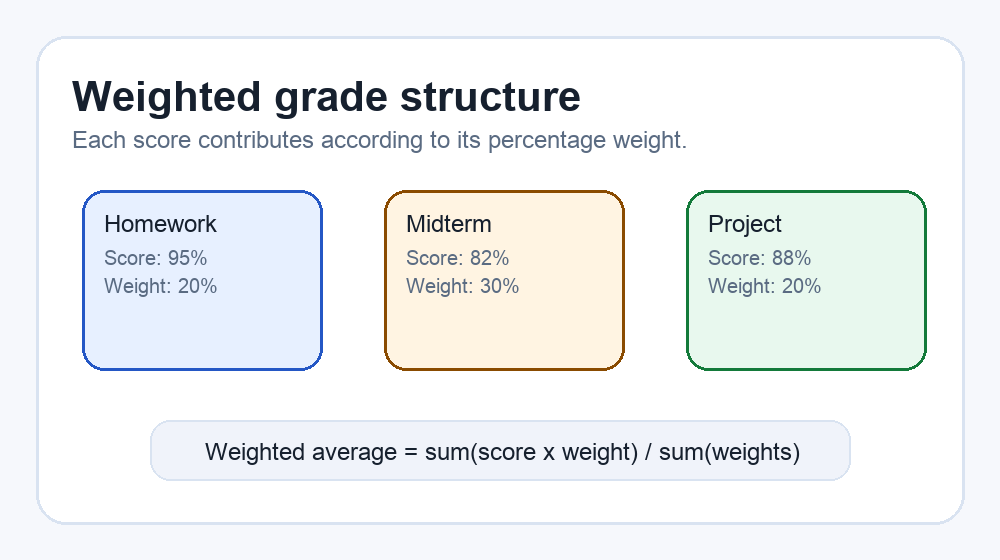
Grade = Σ ( Score × Weight ) ÷ Σ ( Weight )
Each score is multiplied by its weight; the sum is divided by the total weight entered.
The division by total weight is important. If you enter only completed weights, such as 70% of the course so far, the calculator shows your current grade across the work completed. If you enter all 100% of the course, including estimated scores for future work, it becomes a what-if grade calculator for the full course.
This is also the direct answer to how to calculate grade with weights: convert each category or assignment into a score and a weight, multiply score by weight, add those products, then divide by the total of the weights. If your teacher uses points instead of percentages, the point values can act as weights because the same formula still applies.
Example
Homework 95% (weight 20), Midterm 82% (weight 30), Project 88% (weight 20).
Grade = (95×20 + 82×30 + 88×20) ÷ (20+30+20) = 6120 ÷ 70 = 87.4%.
In this example, the midterm matters more than homework because its weight is 30 instead of 20. That is how weighted grades are calculated: the bigger weight has more influence, even when the score difference looks small.
Completed weights vs. full-course weights
If your class is still in progress, your completed work may not add up to 100%. That is normal. For example, homework, a midterm, and a project might total 70% of the grade so far. This calculator divides by 70 in that case, showing your grade for the completed portion of the class.
If you want a projected final grade, add rows for the remaining categories and enter estimated scores. For example, add a final exam row with a possible score and its final exam weight. That turns the calculator into a what-if planning tool and helps you see which remaining scores matter most.
Category weights and weighted percentages from your syllabus
Your syllabus is the best source for category weights and weighted percentages. Look for a grading table with labels like homework, quizzes, labs, participation, essays, exams, midterm, final project, and final exam. If the syllabus uses points instead of percentages, you can still use this calculator by treating each point total as a weight. A 50-point quiz and a 100-point exam can be entered as weights 50 and 100, because the formula divides by the total weight.
For a category-based class, enter each category average once. For example, use homework average 92 with weight 20, quiz average 86 with weight 10, and exams average 81 with weight 40. For an assignment-based class, enter each individual assignment score and its assignment weight. Avoid mixing both methods for the same work, because that double-counts the category.
Weighted grade calculator vs. final grade calculator
A weighted grade calculator is best when you need to combine several scores or categories into one current grade. A final grade calculator is different: it starts with your current grade, target grade, and final exam weight, then solves for the score needed on the final exam.
If you do not know your current grade yet, use this page first to calculate weighted grades from your syllabus. Once you know the current grade before the final, use the final grade calculator to answer what score you need on the final exam. If you also want that grade as a letter or 4.0 GPA, run the percentage through the grade converter.
Common weighted grade mistakes
- Averaging category percentages equally even when the syllabus gives different weights.
- Entering weights as decimals instead of numbers. Use 20 for 20%, not 0.20.
- Mixing category averages and individual assignments from the same category, which double-counts work.
- Assuming weights must always add to 100. They only need to add to 100 if you are calculating the full course grade.
How to use the result
The weighted average tells you where your grade stands after accounting for importance. A low score in a small category may not hurt much, while a slightly lower exam score can matter a lot if exams carry most of the course weight. After you see the result, try changing one row at a time to find the most efficient way to improve your overall grade. At the end of the term, the GPA calculator turns those course grades and credit hours into a 4.0-scale GPA.
Frequently asked questions
How to calculate weighted grades?
Multiply each score by its weight, add the weighted scores together, then divide by the total weight entered. The weighted grade calculator does this automatically as you type.
How to calculate grade with weights from a syllabus?
Use each syllabus category average as the score and the category percentage as the weight. For example, enter homework 92 with weight 20 and exams 84 with weight 50.
How are weighted grades calculated?
Weighted grades are calculated by giving larger categories more influence. A 90 in a 40% exam category affects the overall grade more than a 90 in a 10% homework category.
Do my weights have to add up to 100%?
No. The calculator divides by the total weight you enter, so it works for completed weights below 100% or for full-course weights that add to 100%.
Can I use category averages instead of individual assignments?
Yes. Enter each category average as the score and the category percentage from your syllabus as the weight. Do not also enter the individual assignments from that category, or you will double-count them.
Can I use points as weights?
Yes. If your class uses points, enter the score percentage for each item and use the point value as the weight. The weighted average formula works with any consistent weight unit.
How do I calculate a what-if grade?
Add rows for future assignments or exams, enter possible scores, and include their weights. The result becomes a projected grade based on those what-if scores.
Is this weighted grade calculator free?
Yes. It is free, requires no sign-up, and runs in your browser.